Purchase order approval software: what to actually look for
Sit through three demos of purchase order approval software and you will hear the same pitch three times. Approvals in hours instead of days. Approve from your phone. Build approval chains as deep as you like.
None of that is wrong, and all of it is table stakes. Any tool on a shortlist today routes a PO to the right person and lets them tap Approve from an airport lounge. Speed and routing will not separate the tool that improves your cost control from the one that just moves paperwork faster.
What separates them sits one layer down. When someone approves a PO, does the project budget change at that moment? Could the approver see the budget when they decided? And what happens if the PO would take a budget line over its cap? Those three questions decide whether you are buying a control tool or a routing tool.
What vendors sell on, and what actually matters
Vendors sell on the visible part of the approval workflow: the request, the notification, the button. That is the part users touch, so it demos well.
The part that matters is less visible. The approval event is the moment cost becomes committed. Once a PO is approved, the supplier has the go-ahead and the money is spoken for, whether or not an invoice ever arrives on time. That is what a purchase order does: it turns a decision into an obligation.
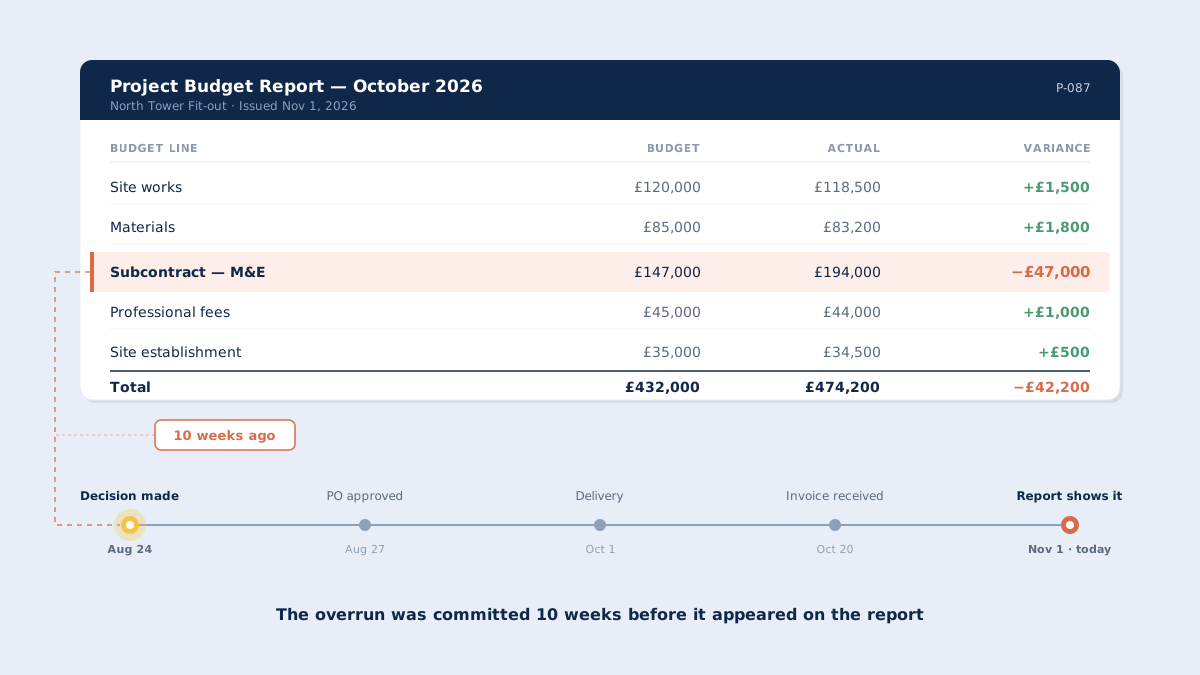
If the software records the approval but does not record the commitment against a budget at the same moment, the budget keeps showing headroom that no longer exists. Finance finds out when the invoice lands, weeks later. That gap is the committed expenditure problem, and approval software either closes it or leaves it open.
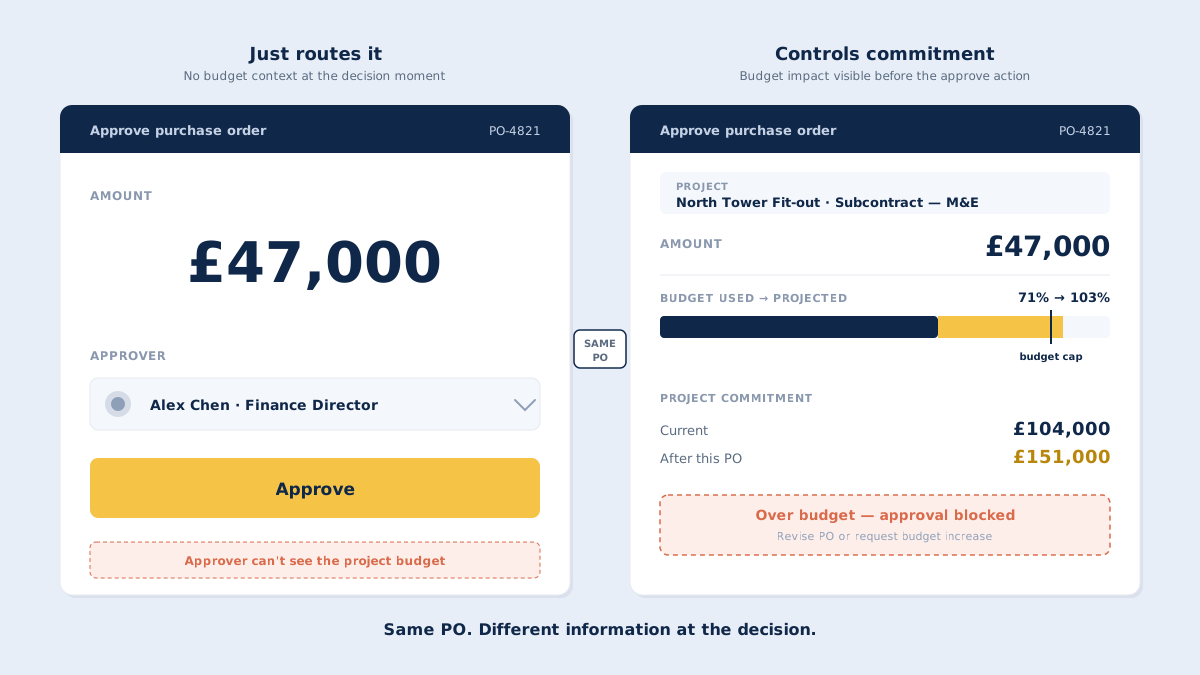
This is why two tools with identical approval screens can produce very different results. In the first, the approver signs and the PO moves on. In the second, the approver signs and the project budget, the commitment total and the cash outlook all change in the same instant. Both demos show a button and a green tick. Only one of them changes what finance knows.
There are plenty of good general reasons to put approvals into a system, and we have covered ten reasons elsewhere, along with the broader benefits of a PO system. This piece is narrower. It is a checklist for the evaluation itself: what to test, and what to ignore.
The 7 things that matter
1. Approval registers the commitment
When the approver taps Approve, the commitment must register against its budget line immediately. Not when the goods arrive, and not when the invoice is matched. This is the foundation of commitment control and of tracking committed cost at all. It is also why the difference between a PO and an invoice matters: the PO is the commitment, the invoice is the bill for it.
2. The approver sees the budget at decision time
The approval screen shows current budget utilisation and what it will be if this PO is approved. On the same screen, at the same moment. If the approver has to open a separate report to find out where the budget stands, they will not do it under time pressure, and the approval becomes a signature rather than a decision.
3. Over-budget approvals are blocked, not warned
A warning that a PO exceeds budget is easy to click past, and under deadline pressure it will be. A hard block is different. If the PO would push the budget line over its cap, approval does not go through until someone requests a budget increase or revises the PO. The point is to force the budget conversation before the money is committed, not to document it afterwards.
CostTracker's approval flow is built around this: approving a PO that would push a budget line over its cap doesn't produce a warning. It produces a block. The approver either requests a budget increase or revises the PO before the commitment is registered.
4. Delegation keeps the record intact
Approvers go on holiday, get sick and sit in all-day site meetings. Delegation has to be possible without breaking the record. A good approval matrix lets the primary approver hand authority to a named deputy, while the commitment is still recorded against the right budget line and the audit trail still shows a named person who made the decision. Test how the requisition and approval flow behaves when the first approver in the hierarchy is away.
5. Changes after approval go back through approval
POs change: quantities grow, prices move, scope gets added on site. Ask what happens when the amount on an approved PO changes. If the change goes straight through, the commitment total drifts away from what anyone signed off. A sound PO approval workflow sends the change back for approval and keeps the committed total accurate as the PO evolves.
6. Approved POs reach the ledger without re-keying
Approval software sits alongside your accounting system. It does not replace it. Once a PO is approved and invoiced, the details should flow to your accounting system with the right general ledger account, project and cost centre, without anyone typing them in a second time. Ask which accounting systems the vendor integrates with today, and ask to see the coding come through.
7. The audit trail outlives the project
Years after a project closes, someone will need to know who approved what, when, and against which budget line, usually for an audit, a dispute or a claim. The log has to survive project close, user changes and permission changes. You will not look at it every day. You will need it badly in the one quarter you do.
Three things that matter less than vendors say
Some features take up a lot of space in demos and do not change outcomes much. They are not bad. They just should not decide the evaluation.
Mobile approval. Useful, and expected. But the quality of an approval depends on what is on the screen, not where the screen is. A phone approval with the budget in view is a good decision. A desktop approval without it is a guess. Digital approval only improves control if the approver can see what they are committing to, so when a vendor shows you the mobile app, check that the budget figures are on the mobile screen too and not left behind on the desktop version.
AI-powered anything. Outside of reading invoice data, most AI claims in this category describe rules that have existed for years. An "AI-powered" routing engine that sends POs over £10K to the finance director is a lookup table. That is fine as a feature. It is a problem as a selling point, because it shifts attention away from the question that matters. Ask the vendor to show exactly what the AI decides, and who is accountable when it decides wrong.
Unlimited approval chains. Most small and mid-sized businesses run two or three approval levels in their purchase requisition workflow. Software built for fifteen-level chains is built for a different organisation. Every extra level adds delay, and a deep chain often spreads accountability so thin that nobody owns the decision. A short chain where each approver sees the budget does more for cost control than a long chain where nobody does.
Red flags during the demo
The best way to run a demo is to bring your own example. Take a real PO from a recent project, with a real budget line and a real approver, and ask the vendor to walk it through their system from request to invoice. Generic demo data is designed to look good. Your own data shows you how the tool behaves on the work you actually do.
While the vendor shares their screen, watch for these warning signs:
- The approver cannot see current budget utilisation on the approval screen.
- Approving a PO does not update the commitment total straight away.
- Budget overruns produce a warning, not a block.
- The vendor describes the software as something that "catches" or "flags" mistakes. Software should show the approver what they need to see. The judgement stays with the person approving.
- The vendor cannot show delegation end to end, including what the audit trail records afterwards.
- The audit trail lives in a different tool from the approvals, which means two sources of truth.
Approval is only half the process. The other half is checking what suppliers bill against what was approved. That is the invoice-matching side of this problem, and it depends on the same thing: a PO that was recorded properly when it was approved.
The best approval software makes 'approved' and 'committed' the same event
Every item on the checklist above is a variation of one principle. The approval moment is the moment cost becomes committed, so it has to be the moment the commitment is recorded. Routing a PO to the right person is the easy part. Recording what that approval means for the budget is the hard part, and it is the part that decides whether finance sees cost when it is decided or weeks after it is spent.
That difference compounds. A routing tool leaves finance reconstructing commitments at month-end from approved POs, email threads and supplier statements. A control tool hands finance a commitment total that is already correct, because every approval updated it. Over a year and a portfolio of projects, that is the difference between explaining overruns and preventing them.
When you evaluate purchase order approval software, test that part first. Approve a PO in the demo and look at the budget line. If it moved, you are looking at a control tool and the committed expenditure view your finance team needs. If it didn't, you are looking at a routing tool.
The best approval tools make 'approved' and 'committed' the same event. See how CostTracker's purchase order approval handles the commitment side.