How to stop paying incorrect supplier invoices (without an AP overhaul)
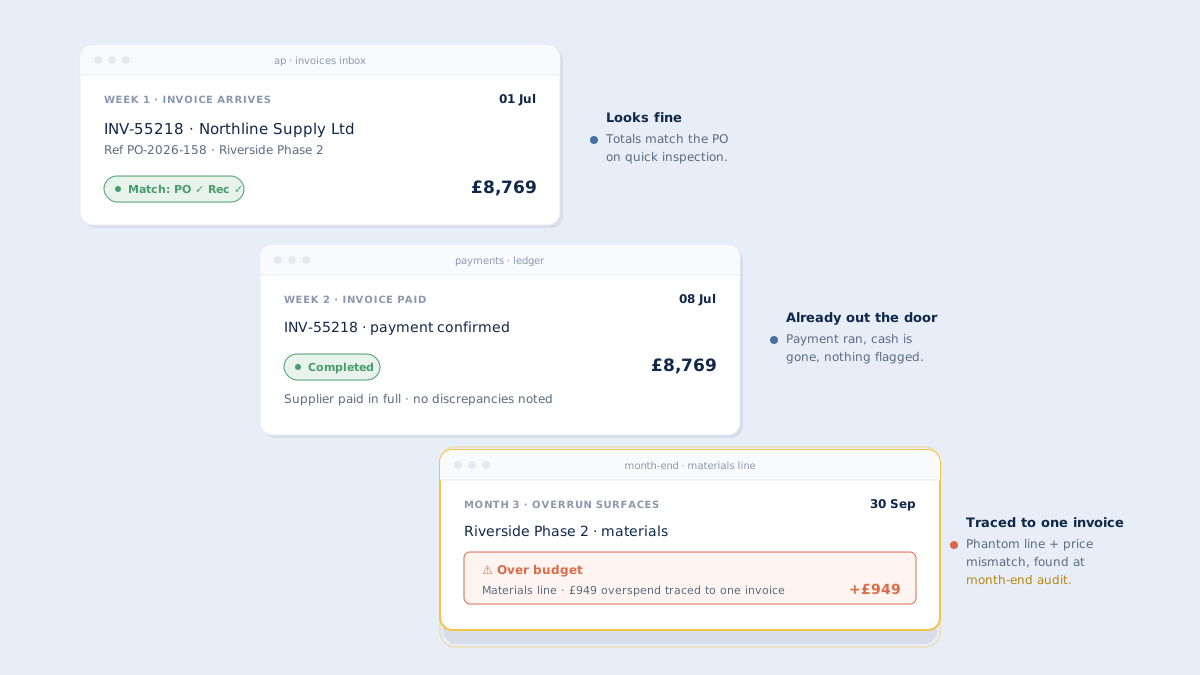
A supplier invoice arrives. Something feels off. The amount's a few thousand higher than you remember agreeing to, or there's a line item nobody quite recognizes. You send it back to the project manager. They look at the PO. They look at the invoice. They can't quite put their finger on what's wrong. The invoice gets approved anyway — the project needs to keep moving, the supplier needs to get paid, and nobody has the time to turn it over properly.
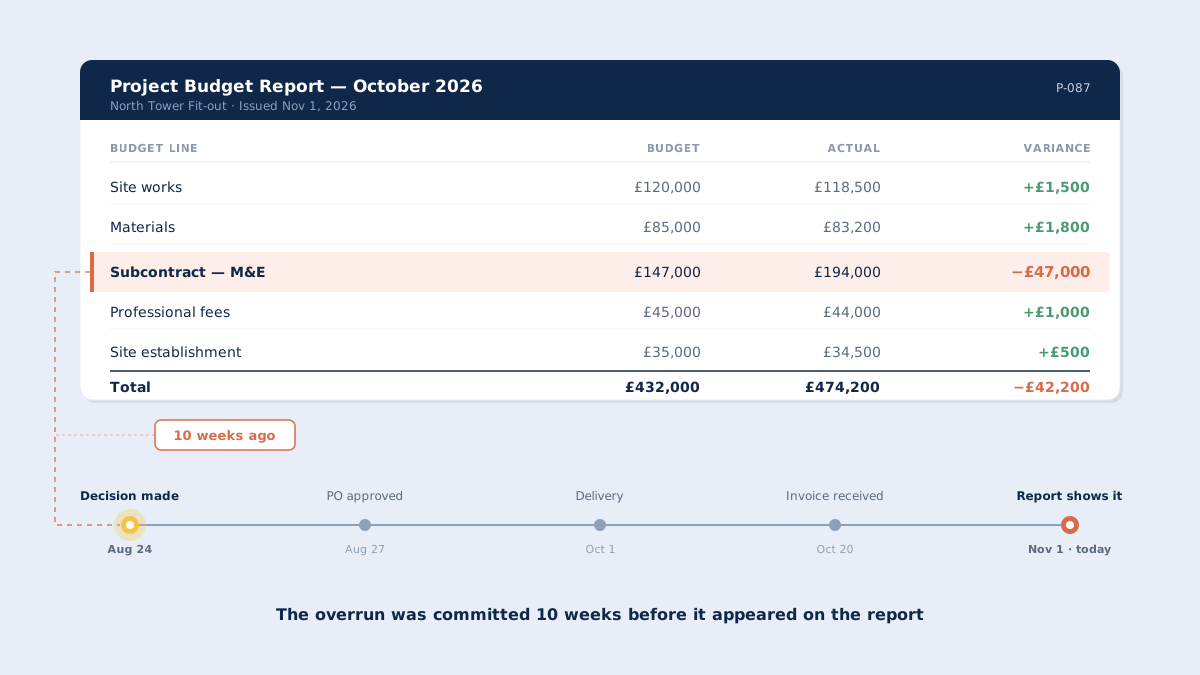
That invoice gets paid in full. Six weeks later, the end-of-month review shows the project ran over budget. Nobody connects the two.
This is one of the most expensive bugs in project-based finance, and one of the least discussed. It costs real money every month, and the standard answer — buy an AP automation tool — doesn't actually solve it. The reason is simple: AP automation is built to pay invoices faster. The problem here is paying invoices that shouldn't be paid at all.
The AP-automation detour
Ask most finance leaders how they'd stop paying wrong invoices, and you'll hear some version of: "We need better AP automation." It sounds right. AP is where invoices come in, so AP is where the problem should be solved.
But look at what AP automation tools are actually built for. They capture invoice data, route approvals faster, match against vendor records, trigger payment runs. The whole category exists to compress AP cycle time — invoices paid in days instead of weeks, less manual data entry, cleaner audit trails, happier suppliers.
None of that solves the problem of an invoice that doesn't match the purchase order.
An AP automation tool will route an incorrect invoice to approval just as efficiently as a correct one. It will capture the wrong amount, present it to the approver, and pay it on time. The automation makes the mistake happen faster.
The structural question — should this invoice be paid at all? — sits before the AP workflow starts. This is why most companies that invest in AP automation discover, two years in, that overpayments and phantom invoices are still happening. The tool did its job. It paid things fast. The job was the wrong job.
Where invoices go wrong
When an invoice does not match the purchase order, it almost always falls into one of three patterns. Each has a different cause and a different fix.
| Pattern | What it looks like | Why it slips through |
|---|---|---|
Price mismatch | Invoice amount higher than the PO authorised — often by a few percent | Looks like a rounding error or acceptable variance; too small to challenge |
Quantity mismatch | Billed quantity differs from ordered quantity, or from what was actually delivered | Delivery note isn't checked at matching time — invoice compared against PO only |
Phantom lines | Line items on the invoice that aren't on the PO at all | Eye is drawn to what the invoice says, not to what it shouldn't say |
Price mismatch
Common causes: price lists changed after the PO was issued; the supplier added a surcharge the quote didn't mention; freight, handling, or minimum-order fees weren't in the original agreement; a bracket price change triggered when quantity shifted. Any one is defensible from the supplier's side. The question isn't whether the supplier is cheating — it's whether the price change was authorised.
Quantity mismatch
The order was for 40 units. The delivery note says 38 arrived. The invoice bills for 42. All three numbers are different, and the invoice gets paid against the PO without anyone checking the delivery note at all. This is where goods-receipt discipline matters. If deliveries aren't recorded in the same system that holds the PO, nobody has the data to spot the drift.
Phantom lines
"Setup fee." "Project management hours." "Expedite surcharge." Sometimes legitimate — scope genuinely changed. Sometimes not — the supplier added a line in good faith, assuming it would be absorbed, and nobody pushes back. Phantom lines are the hardest pattern to catch because they require someone to notice something isn't there.
Why these slip through today
Most companies have some version of invoice-against-PO reconciliation. The problem is it usually looks like this:
- Invoice arrives in AP's inbox or AP software
- AP coder pulls up the PO — sometimes a PDF stored in a shared drive, sometimes in a procurement system that's separate from AP
- They compare the total. The totals are close. They approve for payment.
- The invoice goes to the budget owner for sign-off. The budget owner trusts that AP has already checked it.
- Payment runs. The reconciliation is "done."
The human eye can't catch small discrepancies at volume. If you process 200 supplier invoices a month and each one has 3-8 line items, that's up to 1,600 line items where a few percent variance could slip through. Nobody is going to catch all of them.
The deeper problem is that invoice matching, as practiced in most project businesses, is a comparison between two documents. The invoice and the PO. But that's only two legs of the stool. There's a third: did we actually receive what the invoice is billing us for?
Without that third piece of data at the moment of matching, the AP coder is essentially asking "does this invoice look reasonable against what we agreed to order?" The question that would actually catch overpayments is "does this invoice match what we agreed to order and what we actually received?"
The real fix — three-way matching, done as discipline
The practice that solves this is called three-way matching. Before an invoice is approved for payment, three documents are placed side by side — the purchase order, the goods receipt, and the supplier invoice. The person reviewing the invoice sees all three at once and compares them line by line.
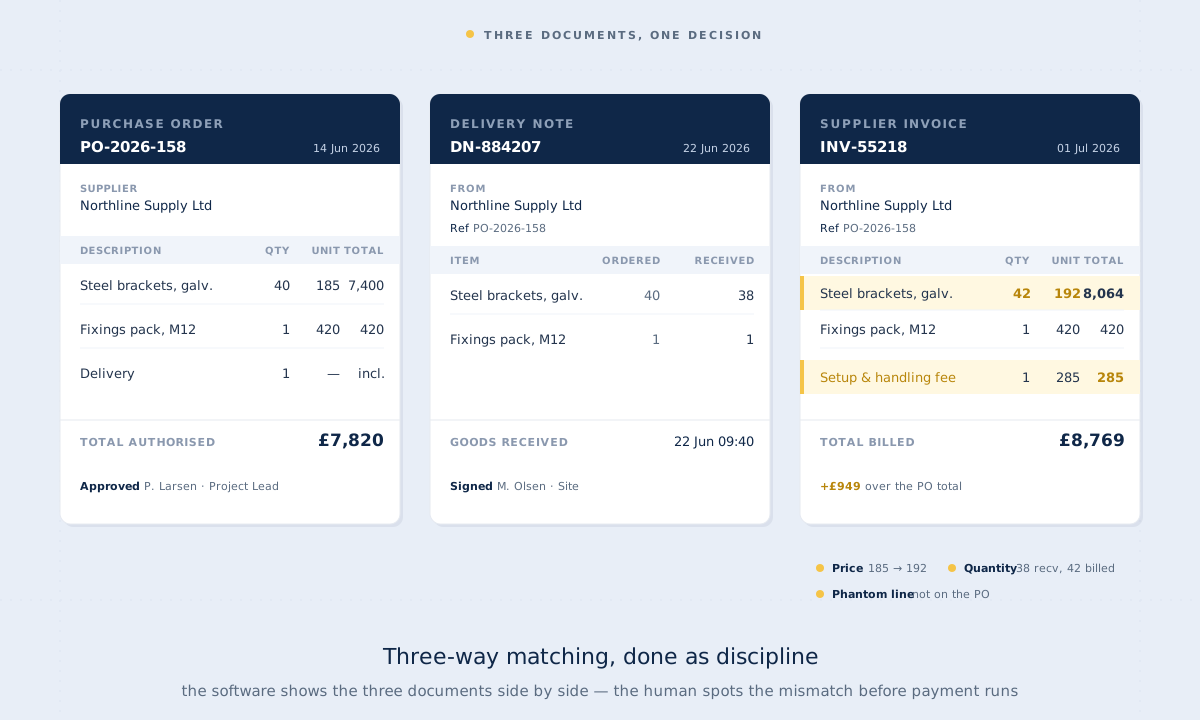
The same transaction, three documents. The mismatches are only visible when all three are on screen at the same time.
Three-way matching is often framed as an AP automation feature. It isn't. It's a cost-control discipline. The software part — if you use software — is just a way of presenting the three documents in one view, at the right time, before payment runs. The actual matching work is done by a human. The software shows; the human spots the mismatch.
This matters because it changes what you're looking for in a solution. If you believe three-way matching is a feature, you buy an AP tool that advertises it and expect the tool to catch the problem. If you understand it's a discipline, you build the practice first — in whatever system holds the PO data — and the tool is just the presentation layer.
The software's job isn't to catch the mismatch. The software's job is to make the mismatch impossible to miss, by putting the three documents in front of the human at the moment of decision.
This is the structural difference between "AP automation" and "three-way-matching discipline." AP automation treats the invoice as the primary document and tries to route it to payment faster. Three-way matching treats the PO as the primary document and holds the invoice against it before anything moves.
What to do differently
Four changes that move the needle without buying a whole new finance stack.
Make three-way matching the default, not the exception
Most companies treat three-way matching as something that happens on "material" invoices — above a certain amount, or for named project categories, or when the AP coder has a specific concern. That's exactly backwards. The small mismatches that pass under the radar are the ones that add up. Three-way matching should be the default review step for every supplier invoice, with carve-outs for the exceptions (recurring utility bills, prepaid subscriptions) rather than the other way around.
Match at line level, not invoice total
Invoice-total matching catches nothing. Two invoices can have the same total with completely different line items. Match at line level: price per line, quantity per line, description per line. If your current reconciliation doesn't do this, that's the single biggest change to make, before any software decision.
Set approval thresholds that force the match before payment
If invoices can be approved for payment before three-way matching has happened, three-way matching won't happen. The approval workflow needs the match as a gate, not a parallel task. Build the sequence so that payment approval requires the matching step to be visibly complete.
Keep the supplier record attached to the PO, not stored elsewhere
When the PO lives in one system (procurement, project-cost software, a shared drive) and the invoice lives in another (AP, ERP, accounting), the match has to be done manually across systems. That friction is where discipline breaks down. The PO, the delivery, and the invoice should be reachable from the same screen at the moment of approval.
The purchase order vs invoice reconciliation gap
Most invoice problems trace back to a gap in how the purchase order is stored and surfaced.
If the PO is a static document — a PDF emailed to the supplier, filed away, retrieved weeks later when the invoice arrives — then reconciliation is a manual archaeological exercise. Someone has to find the PO, open it, compare it visually, remember whether anything changed verbally since the PO was issued, decide if the variance is acceptable.
If the PO is a live record — attached to a project budget, visible to the project team, with its approval chain and any changes logged — then reconciliation is a simple side-by-side view. The variance either exists or it doesn't. The approver sees the full history of what was agreed to and when.
This isn't an AP tooling question. It's a purchase order tooling question. Purchase order reconciliation is only hard when the PO is treated as a disposable document rather than a live commitment against a budget.
When invoice-purchase-order software is the answer (and when it isn't)
At low volume, with low complexity, the manual approach works. If you issue a few dozen POs a month, run small projects where the people issuing POs are also the people reviewing invoices, and have the time to do line-level checking by hand — a disciplined manual process will catch most problems.
Software earns its place in three specific situations:
1 · Volume above the threshold where humans can be reliable
Past roughly 100 invoices a month with multi-line items, manual checking fails — not because people are lazy but because sustained attention at that volume isn't realistic. Software's job here is to present the three documents in one view so the reviewer isn't context-switching between systems.
2 · Multiple projects, multiple budget owners
When invoices need to be matched against the right PO, in the right project budget, with the right approval chain — and those vary by project — manual coordination breaks down fast. Here the software's job is routing, not matching.
3 · Suppliers who invoice irregularly
Long-running projects, retentions, multiple invoices against one PO. The reconciliation isn't one invoice against one PO; it's running totals, partial deliveries, variations. The software's job is maintaining the running balance so the human reviewer can see what's been billed, received, and paid against the original commitment.
In all three cases, what you're buying is a presentation layer and a workflow, not an automated judgment. Any invoice purchase order software that promises to "automatically catch mismatches" is overstating what the software actually does. What it does — reliably — is put the three documents in front of the human reviewer at the right moment, side by side, with discrepancies made visible. The judgment stays with the human. That's a feature, not a limitation.
The real cost of getting this wrong
It's tempting to measure the cost of incorrect invoice payments as the overpayment itself. Supplier billed £8,400 instead of £8,000; you lost £400. If that happens on a handful of invoices a year, the exposure feels manageable. The real cost is wider.
| Cost type | What it actually is |
|---|---|
Direct overpayment | The amount you paid that you shouldn't have |
Rework cost | Hours per instance chasing credit notes, applying them, reconciling — often across months |
Supplier relationship cost | Suppliers who get challenged routinely start padding future quotes to absorb the friction |
Budget-integrity cost | Overpayments distort project cost totals, making your historical cost base unreliable for future estimates |
Cash-flow cost | Paying invoices earlier than needed, in larger amounts than needed, ties up working capital |
When the direct overpayment is a few hundred pounds a month, the total cost of this problem — rework, relationships, data quality, cash — can easily run to tens of thousands a year. Most companies never calculate it because the costs are spread across departments and nobody owns the whole picture.
Where this fits in the bigger picture
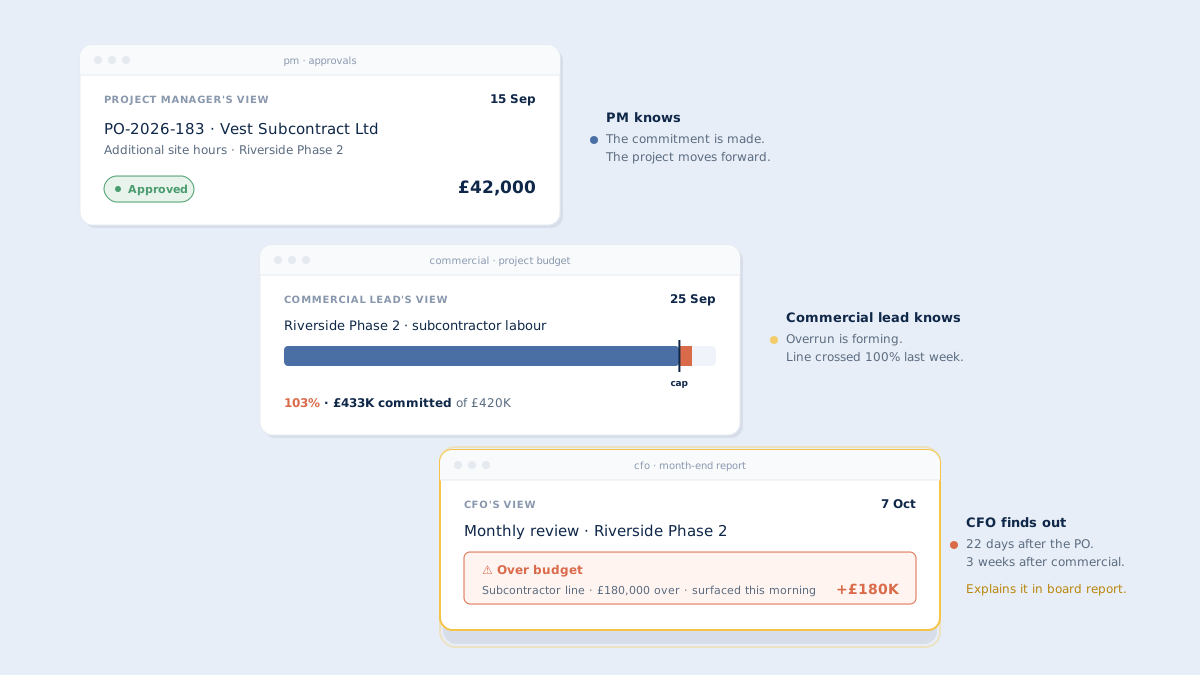
Stopping incorrect invoice payment is one piece of the broader problem of tracking committed cost in real time. If you only see cost when the invoice arrives, you've already lost most of your ability to act on it. By the time an invoice is in the AP inbox, the decision that caused it was made weeks earlier. The invoice is the end of the story, not the beginning.
The upstream fix — capturing cost commitment at the moment the PO is approved, not when the invoice lands — is what makes three-way matching possible in the first place. If the PO lives in a system that treats it as a live commitment against a project budget, the goods receipt and invoice can be matched against it with full context.
So the honest framing is: "stop paying wrong invoices" is a symptom. The underlying practice is treating purchase orders as live cost commitments, not administrative artefacts. Three-way matching is what the discipline looks like at the invoice stage. Committed-cost tracking is what it looks like at the approval stage. They're the same practice, applied at different points in the lifecycle.
You don't need an AP overhaul to fix this. You need to move the matching work earlier in the lifecycle, make the three documents reachable in one view, and build the review step into the payment approval sequence as a gate rather than a parallel task. The software choice follows from that, not the other way around.
See the three documents in one view
CostTracker holds the PO, the goods receipt, and the invoice side by side at the moment of approval — so the person signing off can spot the mismatch before payment runs. The matching work stays with your team. The software just makes the data visible when the decision is made.
Frequently asked questions
Some AP tools advertise three-way matching, but what they actually do is check totals and vendor records. True three-way matching requires the goods receipt as a live input against both the PO and invoice at line level — which most AP tools don't have access to, because deliveries happen in a different system.
Two-way matching compares invoice against PO only. Three-way adds the goods receipt — proof that what was ordered actually arrived in the quantity billed. Two-way catches price mismatches but misses quantity drift and phantom charges that only surface when you check what was delivered.
Done right, almost none. The software's job is to present the three documents side by side; the reviewer scans for discrepancies in seconds per invoice. The friction is one-time setup — getting goods receipts into the same system as POs. Steady-state is faster than today's reconciliation, not slower.
That's exactly backwards. The invoices that slip through are small, repeated ones that collectively add up. High-value invoices get scrutinised anyway. The compounding drift lives below the typical review threshold, which is where three-way matching has to apply.
Then you have the data to have an informed conversation — PO, delivery note, invoice all showing exactly what was agreed and what arrived. Most disputes resolve quickly when the discrepancy is specific. The alternative — paying first, chasing credits later — is both more expensive and more awkward.