
See what was ordered and delivered — before the invoice is processed.
PO, delivery, and invoice — side by side in the same system. See what was ordered and delivered. Compare, decide, act. Fewer errors, less fraud, less handoff.
Invoice in, matched, posted for payment.
The most common way teams use CostTracker: invoice arrives, matched against PO and delivery, transferred to your accounting system for payment.

Receive invoice
Email or upload

Match & process
AI-OCR reads, matched to PO & delivery

Transfer to accounting
Posted for payment in your accounting system
Or use CostTracker on its own. Match invoices without an accounting connection, or add invoice transactions manually. Either way, the audit trail stays in CostTracker.
Match happens where everything already lives.
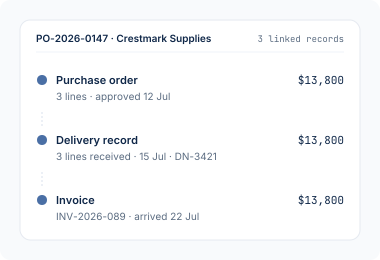
PO, delivery, and invoice — all in CostTracker. No pulling data between tools. Just three sets of numbers, already there, side by side.
- PO and delivery already in the system when the invoice arrives
- All three visible in one view — no handoff between tools
- Full audit trail — every step traceable to source
Skip the data entry — the AI reads and matches for you.
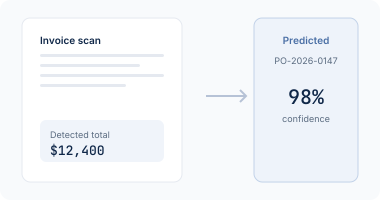
Machine-learning OCR reads incoming invoices — supplier, amount, line items — and pre-matches against the right PO with a confidence score. Routine invoices move fast; anything unusual waits for you to check.
- Reads incoming invoices automatically
- Pre-matches against the right PO with a confidence score
- Improves over time — you stay in control of the final call
Every difference visible — you decide what happens next.
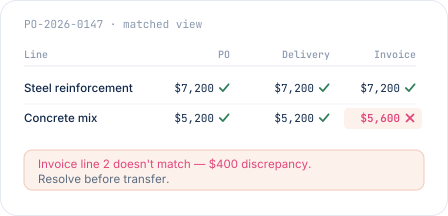
PO, delivery, and invoice line up in the same view. A price bump. A short delivery. A line billed for what wasn't received. You see it before it moves forward — then decide what to do.
- PO, delivery, and invoice line by line in the same view
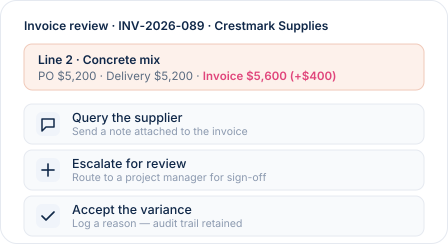
- Query the supplier, escalate, or accept — decide in-system
- Every action logged with the invoice — full audit trail
"Cost reporting and AP integration is great. Time saved is massive."
Fidelis M.
Group Finance & Risk · Civil Engineering
Three-way matching, answered plainly.
Not necessarily. If you record deliveries in CostTracker, matching is three-way — PO, delivery, and invoice. If you don't, it's two-way — PO and invoice. Either works. Three-way catches more (missed deliveries, short receipts), so it's stronger if the workflow supports it.
You will easily spot deviations when doing three way matching. You can query the supplier, escalate for review, or accept the variance (with a reason). You have the visibility and control the flow.
CostTracker matches and processes invoices — verifying they line up with the PO and delivery. Approval is handled by your usual workflow (project manager, finance sign-off, whatever fits). Payment happens in your accounting system after the transaction is transferred.
Accounting systems match against the PO once it's been imported and the invoice logged. That's two data-transfer steps and often a manual reconciliation. In CostTracker, the PO, delivery, and invoice all live in the same system from the start — matching is comparing numbers that are already there, not chasing them across tools.
It works well with common formats — PDFs, scanned documents, structured e-invoices. Confidence drops on unusual layouts, and low-confidence reads sit waiting for you to check rather than getting through unnoticed. The model improves as it processes more of your suppliers' invoices.
CostTracker works stand-alone or connects to Xero, QuickBooks Online, Sage, Tripletex, PowerOffice Go, or Finago. Matched and approved invoices transfer as transactions ready for payment.
Pay only what was ordered — only what was delivered.
14-day free trial. All features included. No credit card. Set up in an afternoon.