PO system or ERP module: which fits a project-based business?
If you are trying to get purchase orders under control, you have probably been pitched two answers. Add the procurement module to the ERP you already run, or bring in a dedicated PO system that connects to your accounting. Both sales teams promise the same things: faster approvals, better visibility, integrated workflows.
The pitches sound interchangeable. The products are not. That is not because one category is better than the other. It is because they were built for different shapes of problem, and the right choice depends on which shape your business has.
Two paths, and the choice depends on how you work
The first path is the ERP procurement module. It is an add-on to the system that already runs your finance, inventory and often your manufacturing or distribution. Purchasing becomes one more process inside that system, sharing its supplier records, item master and reporting structure.
The second path is a dedicated PO system. It is a separate tool built around the purchase order itself: who asks for what, who approves it, what budget it is committed against. It integrates with your accounting system instead of replacing it.
Most businesses that reach this decision have outgrown something. Approvals happen on email and nobody can find them later. Budgets live in one place and orders in another. Finance learns about commitments when the invoice arrives. Both paths promise to fix that, which is why the pitches sound alike.
Both understand the role of a purchase order. Both can route approvals and produce reports. The question is not which one has more features. It is which one was designed for purchasing that looks like yours.
The decision isn't about features, it's about problem shape
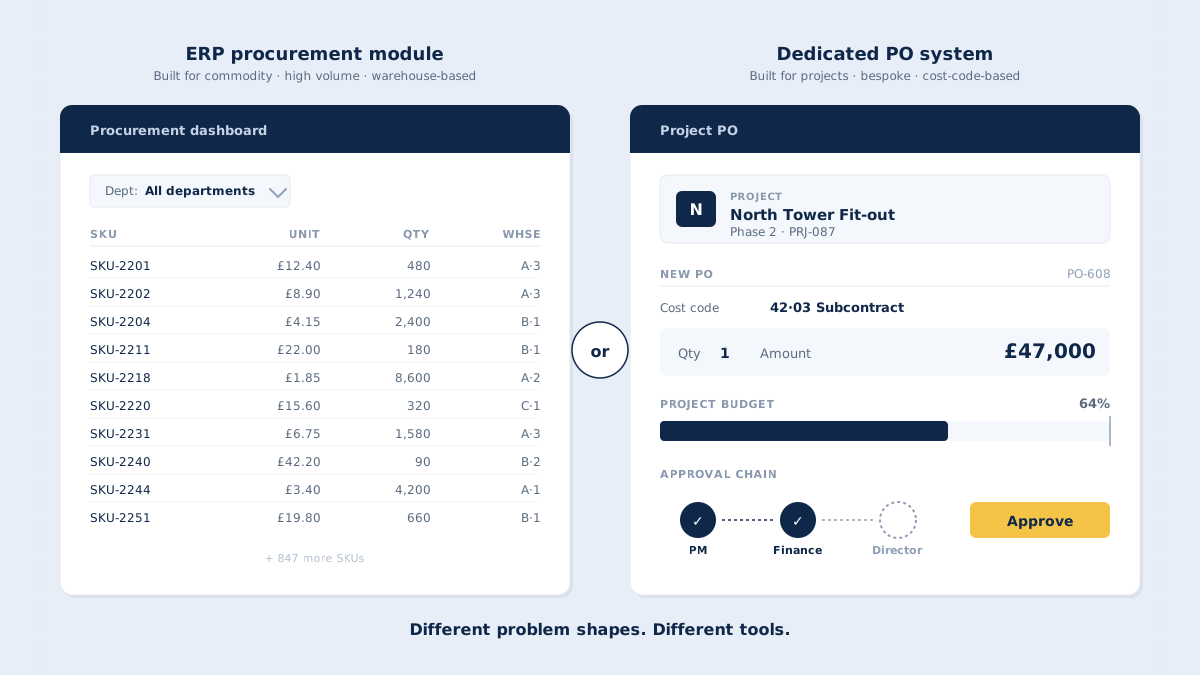
Watch an ERP demo and a dedicated PO demo back to back and you will notice the examples are different. The ERP vendor shows a buyer reordering stock items from a catalogue, with quantities driven by warehouse levels. The dedicated PO vendor shows a project manager raising a one-off order to a subcontractor, coded to a project and a cost code.
Each demo looks strong because each vendor is showing the problem their product was optimised for. A feature-by-feature comparison between them cannot settle the decision, because the same feature means different things in different contexts. "Supplier management" in a catalogue-based world means price lists and SKUs. In a project-based world it means a long, changing list of subcontractors, many of whom you will use once this year.
The same goes for reporting. Both categories will tell you they have "real-time reporting". In one, real time means stock positions and purchase volumes by department. In the other, it means committed cost against each project budget line. Both claims are true. Only one of them answers the question your finance team is asking.
So move the question up a level. Before comparing features, work out what shape your purchasing has. Four questions do most of the work.
Four questions that decide it
What's your PO volume shape?
Count your purchase orders and look at their size. Ten thousand small, repeat orders a month is one shape. Ten to a few hundred larger orders a month, each tied to a project, is another.
ERP procurement modules are built for the first shape: bulk handling, catalogue ordering, links to stock levels. Dedicated PO systems are built for the second: attention at the level of the individual order, subcontract line items and prices agreed job by job.
How variable are your purchases?
If most of your spend is repeat orders from a stable list of suppliers, you need supplier records, item lists and price agreements. That is ERP territory.
If most of your spend is one-off work orders to a changing mix of subcontractors and specialist suppliers, you need flexibility. Each order may be the only one you place with that supplier this year. A purchase order system built for projects handles that without forcing every order into a catalogue structure.
What's the reporting unit?
This is the clearest divider of the four. Do you report cost by item, warehouse and department? Or by project, phase and cost code?
If the report you need says "£340K committed to subcontract labour across these three projects this quarter", a module built around warehouse accounting will fight you. The data can be extracted, but every report becomes an export and a spreadsheet. A system built around projects produces that report directly, including budget vs committed reporting per project line.
Who approves?
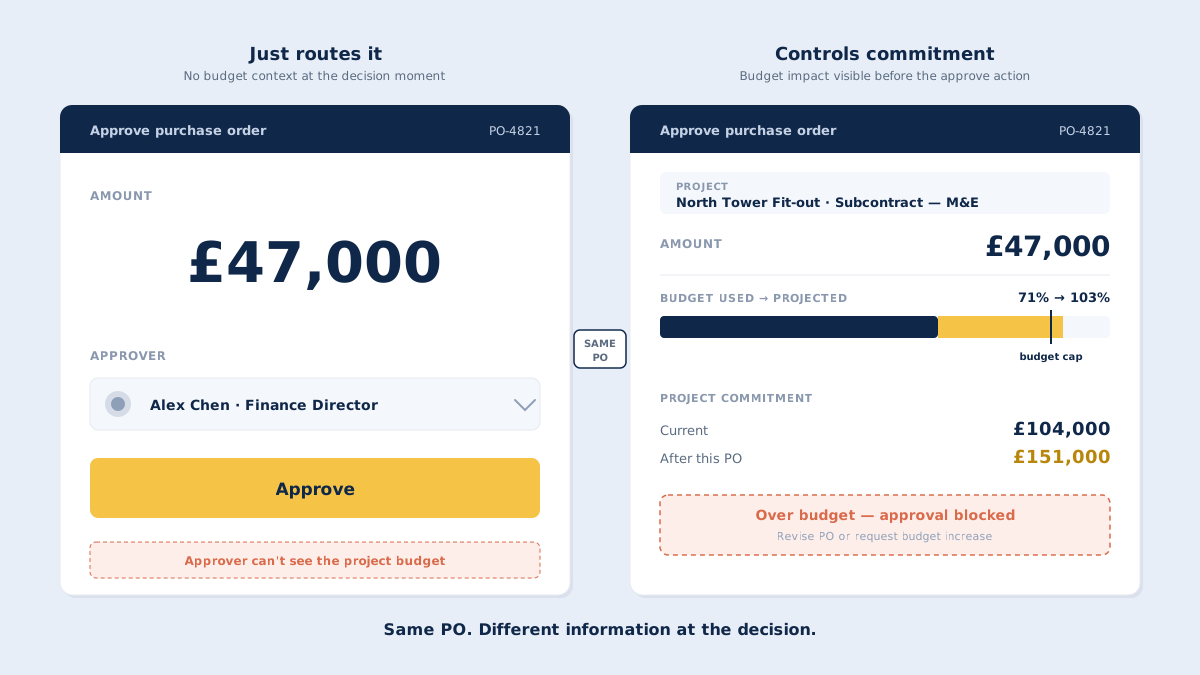
In most ERP procurement modules, approval sits with finance or a central purchasing team working through a procurement queue. In project-based businesses, the person best placed to approve is usually the project manager, who knows whether the order is needed and what it does to the project budget.
The approval interface follows the approver. A finance user in an ERP queue needs different information from a project manager on site. We go through what that interface should show in what matters in purchase order approval software.
When the ERP module is right
Some businesses should add the module and stop looking. The profile is clear:
- Volume: high-volume, repetitive purchasing, often above 1,000 POs a month.
- Suppliers: a catalogued supplier base with agreed prices and item lists.
- Drivers: inventory-driven reordering, with purchasing tied to stock levels and reorder points.
- Reporting: cost centres organised by department, item and location.
- Adoption: a well-used ERP that most of the business already works in every day.
Manufacturing, distribution and retail businesses often match this profile. For them, the integrated procurement module is the right answer. Purchasing sits next to inventory and finance, the data model fits, and there is no second system to maintain. The ERP vendor is not misleading you. All the benefits of a PO system apply, delivered inside the system you already have.
When a dedicated PO system is right
The opposite profile is just as clear:
- Volume: fewer, larger purchase orders, typically somewhere between 10 and 200 a month.
- Suppliers: a varied mix of subcontractors and specialist suppliers, changing from project to project.
- Drivers: project scope, with purchases decided by the people running the work.
- Reporting: cost by project, phase and cost code, with budgets set per project rather than per department.
- Adoption: project managers who need to approve with the project budget in front of them.
Construction, engineering, marine, energy and events businesses often match this profile. For them, a dedicated PO system is the right answer. It works as a project cost control system rather than a purchasing department tool, and it fits the way the work is actually organised.
What a dedicated PO system does that an ERP module doesn't
For businesses with the project profile, four capabilities make the difference.
- Project-first cost structure. Every PO is coded to a project, phase and cost code when it is created. Department and item come second, if at all.
- Commitment registered against the project budget. When a PO is approved, the commitment is recorded against the project budget line straight away. This is what tracking committed cost means in practice, and it turns the system into a cost tracking system rather than an order log.
- Integration with the accounting system, not replacement. The PO system feeds the general ledger. The accounting system still owns the books. Nothing has to be migrated out of the system finance already trusts.
- Approval that reaches project managers on site. Approvers are not only in finance. They are project managers who need to approve from a phone, with the budget line visible, between site meetings.
None of this works if the budgets themselves are vague. A project budget with three lines cannot tell you much about commitments made against it, so project budgeting best practices come first.
CostTracker's purchase order software is built for this shape of problem: project-based businesses with one-off orders to varied subcontractors, cost-code reporting and approval led by project managers. It works with project budget control and connects to your accounting system through accounting integrations rather than replacing it.
The third option nobody mentions: spreadsheets
Plenty of well-run businesses manage purchasing in a spreadsheet, and many of them should keep doing so. A spreadsheet is free, everyone knows how to use it, and it bends to whatever the business needs this week. Below a certain size, nothing beats it.
The question is where that size limit sits. Above a few markers, the picture usually tilts:
- More than five active projects at once. Keeping commitments current across that many budgets by hand becomes a job in itself.
- More than three people approving purchases. Each approver needs the same up-to-date view, and a shared file rarely gives them one.
- Approvals with real stakes. Once a single PO can materially change a project margin, the cost of a stale number goes up.
- More than one person needing the same budget line in real time. Two people working from two versions of a sheet is where errors start.
Below those markers, a spreadsheet is cheaper, faster and has no friction. Above them, it starts producing the drift it was meant to prevent, and the time spent keeping it current becomes one of the hidden costs of manual procurement. The thresholds are guidelines, not rules. A simpler test is time: think about the last time someone asked how much of a project budget was already committed. If the answer took a few seconds, the spreadsheet is doing its job. If it took an afternoon of checking with project managers, it is not. If you are below the markers and the spreadsheet works, keep it.
Match the tool to the problem, not to the brochure
The useful question is not "ERP or PO system?" It is "what shape of problem are we solving?"
Mixed businesses exist too. A contractor with its own fabrication shop may have catalogue purchasing on one side and project purchasing on the other. In that case, look at where the money goes. If most spend sits on projects, the project shape should decide the tool, and the stock side can stay where it is.
If your purchasing is high-volume, catalogue-based and tied to inventory, the ERP module fits. If your purchasing is project-based, subcontractor-heavy and reported by cost code, a dedicated PO system fits. If you are small enough that one person can hold every budget in their head, a spreadsheet fits. Each is the right answer in the right context.
For project-based businesses, the choice shows up later in the numbers. A system that records commitments against project budgets as they are approved gives you a reliable estimate at completion, because the cost to date includes everything already agreed, not just what has been invoiced.
Match the tool to the problem, not to the brochure. If your problem shape matches the dedicated PO system profile, see what CostTracker's purchase order software does.