
Budget control that blocks overruns before they happen
Every commitment lands against the project budget the moment a PO is approved. Cost overruns become visible early — and strict mode stops over-budget requests before they commit.
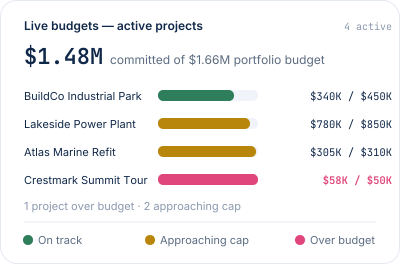
Cost overruns rarely start with one big event.
They accumulate — an unapproved change here, a scope addition there, a supplier quote that crept up. Each one small, none of them caught, until month-end shows a 20% overrun and it's too late to do anything about it.
The budget updates the moment cost commits.
Commitments, invoices and planned purchases all land against the right project and category in real time. You're never working from last month's numbers.
- Live budget per project & category
- Drill into the line that drove the change
- Same number for ops, finance and the board
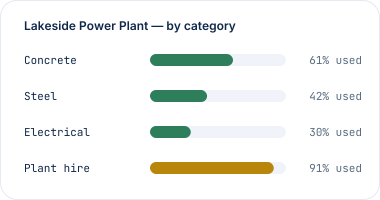
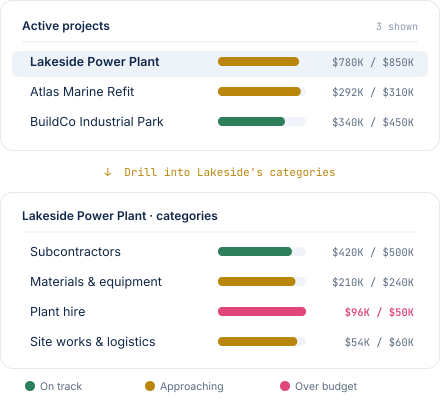
From project to category to PO — one click at a time.
See a project running hot? Click it. See a category over budget? Click it. Every number on the page is a doorway to the detail that drove it.
- Project → categories → individual POs
- Every commitment traceable to its source
- Same view for finance and project teams
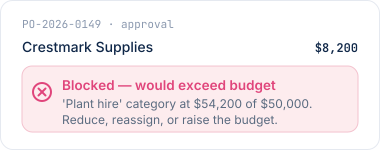
Stop budget overruns at approval.
Turn on strict budget control and any PO that would push a budget over is blocked at the approval step — caught before it commits, not discovered in next month's close.- Optional — turn on per project
- Caught at approval, not at invoice
The right people see the right budgets.
Not everyone needs to see everything. Set who sees which budgets — by project, role, or team — so people get exactly the view they need, and nothing they shouldn't.

Project team
See your own project's commitments and budget headroom.

Project manager
Drill into every line across the projects you lead.

Finance & leadership
Whole-business view across every project, in one place.
"CostTracker has made it easier for us to have clear agreements with our suppliers, and at the same time have total cost control. We save a lot of time and money."
Morten H.
CEO · Oil & Energy
Budget control questions, answered plainly.
Your accounting system shows what's been invoiced. CostTracker shows what's been committed — the moment a PO is approved, weeks (or months) before any invoice arrives. That gap is where projects go over budget.
Real time. Every approved commitment lands against the budget instantly. No batch processing, no overnight sync.
Turn on strict mode per project. When someone submits a PO that would push a category over its budget, the approval is blocked. Reduce, reassign, or raise the budget — decide before it commits.
Visibility control is per budget. Set who sees which budgets in the budget settings.
Yes. Every budget line drills down: project → category → PO. Every commitment is traceable to its source.
CostTracker works stand-alone or connects to Xero, QuickBooks Online, Sage, Tripletex, PowerOffice Go, or Finago.
Catch cost overruns before month-end does.
14-day free trial. All features included. No credit card. Set up in an afternoon.