
Requisitions routed to budget approvers — signed off in sequence.
Fill in the PO — supplier, items, prices — and send for approval. Routes in sequence based on approval limits. Approved requisitions become POs immediately.
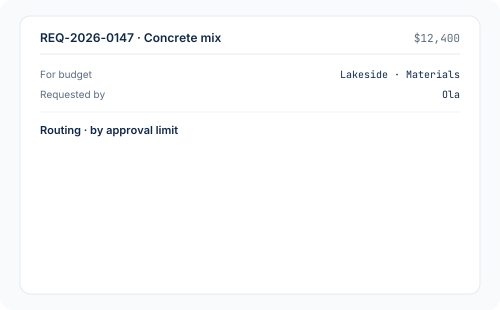
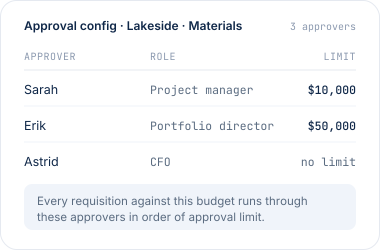
Approvers per budget. Limits per person. Sequential sign-off.
Configure once: approvers per budget, and their approval limits. Every requisition routes in sequence based on project and approval limits. Each approver signs off in turn until the amount is fully covered.
- Set approvers and limits per budget — once
- Every requisition routes in sequence — budget owner first
- Multi-level chains — everyone signs off in turn
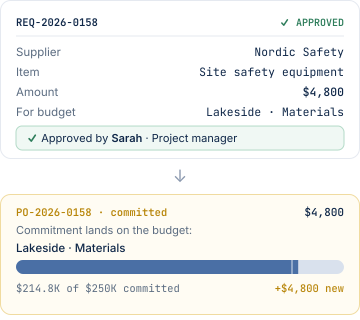
Approved requisition becomes a PO — immediately.
No re-keying. No lag. The moment the last approver signs off, the requisition converts to a purchase order — carrying its reference, its project, and its budget line through to the commitment.
- Approved requisition → PO in one step
- Reference, project, budget line all carried through
- Commitment lands on the budget the moment the PO exists
See purchase orders →
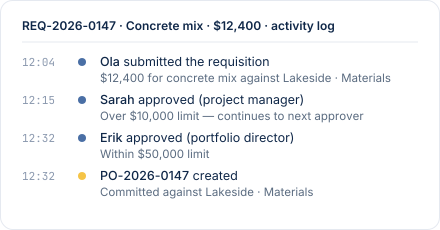
Every step logged. Nothing hidden.
Who submitted. Who approved. When. Why. Every decision on a requisition is timestamped and attached — traceable from requisition to PO, from PO to invoice, all the way through.- Every submission, comment, and approval logged
- Traceable end-to-end: requisition → PO → invoice
- Ready for audit — no exports needed
"Great project tracking software. It has allowed us to get a detailed handle on our production jobs and get on top of our budgets."
Tim B.
Director · Construction
Purchase requisitions, answered plainly.
Approvers are configured per budget. For each budget you name the people who can authorise spend against it, and their approval limit. When a requisition lands, it follows the config: lowest approval limit first, then up the chain in sequence if needed.
Every approver in the chain signs off in turn — no steps skipped. The budget owner approves first (even if the amount exceeds their limit), then it continues to the next approver, and so on until someone with the limit to cover the amount has signed off. Everyone in the chain sees and signs off in sequence.
Yes — you can set an amount where the system automatically approves the purchase. In this case, only purchase requisitions above that limit goes for approval.
Yes. Every requisition names the budget it's requesting against — that's how the routing knows which approvers to use, and how the committed cost lands when it becomes a PO. No orphan requisitions.
The moment the final approver signs off. The requisition's details — supplier, project, budget line, quantities, prices — carry through to the PO automatically. No re-keying. The commitment lands on the budget the moment the PO exists.
A requisition on CostTracker is a completed PO — supplier, items, prices, budget — submitted for approval. Once approved, it becomes an actual PO that goes to the supplier. Requisitions live inside your team while they're being signed off; POs go to suppliers. CostTracker handles both, converting one to the other automatically.
Every requisition to the right approvers — in sequence.
14-day free trial. All features included. No credit card. Set up in an afternoon.