
Know where the project stands — while there's still time to act
Every approved PO, every milestone, every invoice — placed in the week or month it falls due. As commitments change, the forecast changes with them. No projections, no spreadsheets, no overnight batch.
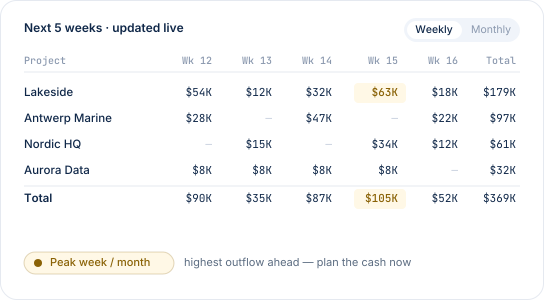
Forecast from real POs — not projections.
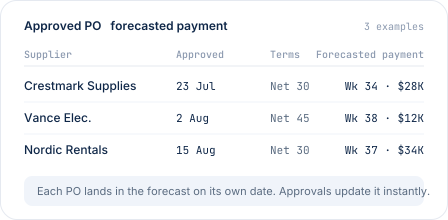
Every approved PO carries an amount, a due date, and payment terms. CostTracker places each one in the week or month it falls due. Add a milestone split? Every stage lands on its own date. Invoice arrives early? The forecast updates.
- Built from committed cost, not historical trends
- Updates instantly as POs are approved — no batch
- Same working data as your budget — no separate model to reconcile
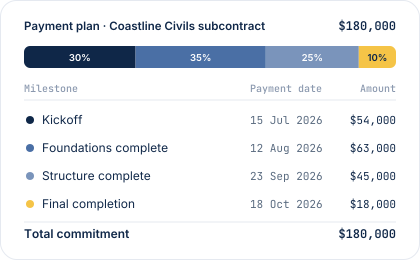
For work that pays out in stages.
Subcontracts, staged supplies, and construction work rarely pay in one lump. Split a PO into milestones — by percentage or fixed amount — and each stage lands in the forecast on its own date. A $180,000 subcontract shows up as the four payments it really is.
- Split any PO by percentage or fixed amount
- Each milestone forecasts on its due date
- Change one stage — the forecast updates for the rest
See what's coming — before it's approved.
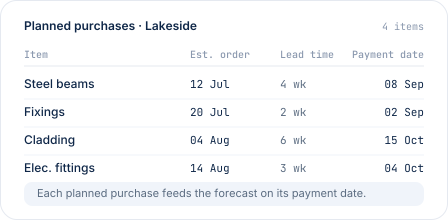
Turn on planned purchases and your upcoming buying plan feeds the forecast alongside approved POs — so you can see the next weeks and months of project spend before commitments are formally in. It's still real data: your own team's plan, not a projection or an ML guess.- Optional module — turn on per team or per project
- Planned purchases feed the forecast on their payment date
- Convert a plan to a PO when ready — it moves from Planned to Approved
Where the forecast connects to the rest.
The forecast runs across every project, in your base currency — even if suppliers invoice in others. See the whole business at a glance, or drill into a single project.
Your accounting system already holds most of what's happening — invoices, salaries, sales, day-to-day operations. What's harder to see there is forward-looking cash out from project commitments: approved POs not yet invoiced, milestones due later, payment terms landing across different months. That's what CostTracker forecasts. Export it back to your accounting workflow and you have the complete cash picture.
See our accounting integrations here
"Delivered exactly what we required — recommend. CT ensured that we hit our budget, vs previous projects with budget overruns."
James B.
CFO · Hospitality & Events
Cash flow questions, answered plainly.
Both, honestly. The forecast is built from what's committed today — approved POs, staged milestones, invoices with due dates. It's not a prediction. But it does look forward: any commitment you approve now lands in the forecast for its due date, not for today. So the forecast changes as you approve, not because we're guessing what you'll approve next.
A spreadsheet forecast is someone's estimate, updated once a month or once a quarter. CostTracker's forecast rebuilds itself every time a PO is approved, a milestone is added, or an invoice lands. Same source of truth as the rest of your cost control — no separate model to reconcile.
Yes. Set your base currency once in settings — POs raised in other currencies are converted to base automatically, so the forecast reads in one currency. Exchange rates update nightly.
Both. Drill into any single project to see its own forecast, or roll every project together for the whole-business view. Switch between weekly and monthly with one click.
Standard payment terms (Net 30, Net 45, etc.) are set per supplier and applied automatically on the PO. For staged work, split the PO into milestones with fixed dates or percentages — each milestone lands in the forecast on its own date.
No — the two are complementary. CostTracker forecasts what you'll pay out based on real approved commitments. Your accounting system reports will include the revenue, staff payments and actuals. Export from CostTracker to consolidate with the accounting view and you get the full picture.
Forecast from what you've approved, not what you hope for.
14-day free trial. All features included. No credit card. Set up in an afternoon.