
Real-time cost data — in every view your team needs.
Dashboard, reports, archive, API — all backed by real-time cost data. Every commitment shows up the moment it's approved.
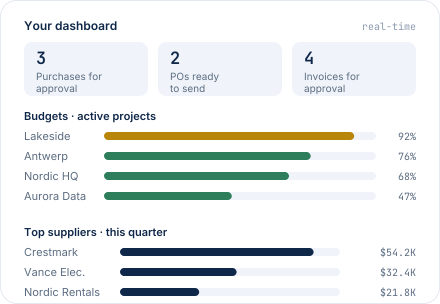
The workspace you'll come back to.
Not a BI dashboard — a workspace. See what needs your attention today: requisitions to approve, invoices to review, budgets running hot. Plus the numbers you glance at daily — what's committed, what's coming, and who you're spending with.
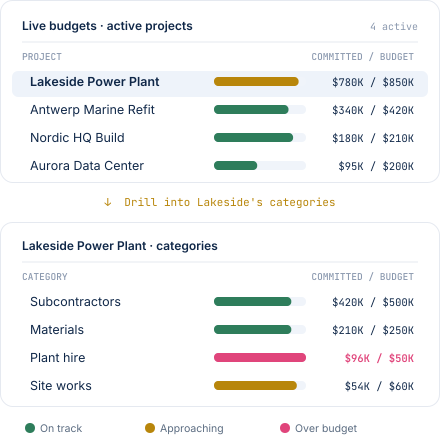
The reports you'll reach for most, ready to run.
Built in — no setup, no report-builder learning curve.

Budget report
With drill-down to the line that drove the change.

Purchased items
Every line of every PO, filterable by project & period.

Cash-flow report
Weekly / monthly forecast from real commitments.
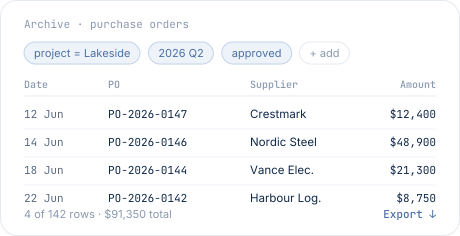
Filter, pull, export — your data, your way.
Every PO, requisition, invoice, and delivery sits in a customizable archive. Filter by project, supplier, date, category or status; export to CSV or Excel for the spreadsheet work you can't avoid.
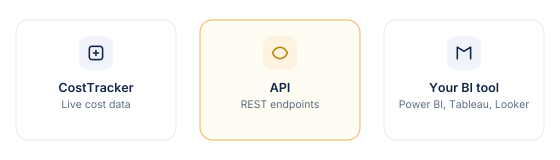
Feed the reporting tool you already use.
A documented API for reporting: connect CostTracker to Power BI, Tableau, Looker, or your data warehouse — and pull cost data on a schedule. Cost data flows out alongside your accounting system's, so you can bring it all together in one place.
"Really value the ability to pull very detailed reports. Integration of purchase orders and budgets. Very pleased."
Larissa P.
Admin manager · Media production
Reporting, answered plainly.
No — it's a workspace. You see what needs your attention today (requisitions, invoices, budgets running hot) plus a few key numbers and simple bars per project and per supplier. For deeper analytics, use the archive export or the API to feed a real BI tool.
Budget report with drill-down, item-line report, cash-flow report, and delivery report. All backed by real committed cost data — so they show what's coming, not just what's been invoiced. No report-builder learning curve.
The archive is where custom questions get answered. Filter by project, supplier, date, category, or status; export to CSV or Excel. For anything beyond that, the API connects CostTracker to your BI tool of choice.
Everything you've done in CostTracker stays available — POs, requisitions, invoices, deliveries, approvals, comments. No automatic archiving off. Historical data is queryable the same way as current data.
Anything that can consume a REST API — Power BI, Tableau, Looker, custom data warehouses. Documented endpoints, standard authentication.
Both. Reports include approved POs (committed but not yet invoiced), invoices (received and processed), and everything in between. This is the main difference vs reporting from accounting alone — you see what's coming, not just what's happened.
Cost data ready — however you want to see it.
14-day free trial. All features included. No credit card.